This is going to be a cool update for the Xbox 360. Check it out.
Xbox Originals
Starting on December 4, all Xbox LIVE members will receive a free system update with a host of new features and enhancements. Included in this update will be the launch of the Xbox Originals, which, for the first time ever, will enable consumers to download and own full Xbox games , such as Halo® , Psychonauts™, Crimson Skies®: High Road to Revenge™, and Fable ® among others directly to their Xbox 360. This new service will launch with an array of blockbuster titles spanning the most popular genres from action-adventure to classic role-playing games.
With no disc necessary, and at just 1,200 Microsoft Points per game, Xbox LIVE members can easily rediscover these hit titles, or check out a game they missed the first time around. This launch line-up is only the beginning as Xbox 360 owners can expect to see a growing catalogue of Xbox games for download to own over the coming year.
"In just five short years Xbox LIVE has revolutionized the way friends and family have fun in the living room," said John Schappert, corporate vice president of LIVE, software and services at Microsoft. "On its fifth birthday, Xbox LIVE truly is the place for hanging out with friends and enjoying downloadable TV shows, movies, videos, game add-ons, and now downloadable Xbox games on demand."
Found this on another blog. I was having the same problem. I figured some of you might be able to use this too. It's a simple solution.
I’ve had an annoying problem for a while now and finally got around to looking into it. My Task Manager was missing all it’s tabs. In fact, it was getting displayed without being hosted within its usual Windows Form. I had know idea what I did to deserve this. See below.
Anyways, it’s an easy fix. Simply double-click anywhere around the border to viola! it’s back!. Double-click again and it goes back into this minimalist mode.
Today is my wife's birthday. Happer Birthday to her. I'm getting her a massage for her birthday. She'll be really happy about that. My sons birthday is in a few days. I'm having to work on Cyndi's and my sons birthday.
I took an old wireless router that I had and decided to use it as a wireless access point. I now have 3 wireless points in my house. It's a little over-kill. I can't hardly even get signal from the one in the laundry room. It's still cool to have. I have 1 in the living room, 1 in the den, and 1 in the laundry room. I mostly use the one in the living room.
TV Links - Better than a remote control. That says it all. It's a website where you can watch tv shows that have already aired. They include: shows, cartoon, documentaries, anime, movies and music videos. The only disadvantage is if you watch half a show and then want to see it later, you will have to wait for the whole thing to load again. Oh, did I mention everything is free. That's the best part. They are always adding to the site. Check it out.
Joost is a new way of watching TV on the internet. With Joost, you get all the things you love about TV, including a high-quality full-screen picture, hundreds of full-length shows and easy channel-flipping.
Inside the box
You get great internet features too, such as search, chat and instant messaging, built right into the Joost software – so you find shows quickly and talk to your friends while you watch. And with no schedules to worry about, you can watch whatever you want, whenever you like – as often as you want. Joost is completely free, and works with most modern PCs and Intel Mac-based computers with a broadband connection. Get Joost today!
If you have an internet connection, you should try the Joost Beta. It's kind of like having Tivo over the internet. It has a good selection of channels, including Comedy Central, MTV, CBS and others. Give it a try.
Beyond TV 4.6NEW is how television was meant to be watched...
Record and watch TV with your PC.Gain control over your entertainment experience. With Beyond TV, you determine what you want to watch and when you want to watch it. With incredible features and extensive setting options, TV is under your control.
More than a DVR, Beyond TV gives you...
No Subscription Fees. Ever.
Skip commercials and other parts of TV shows
Search for shows on actor, director, or title
New!Burn DVDs of your TV recordings*
Intelligent Program Guide resolves conflicts
Record HDTV from free, over-the-air or Clear QAM digital TV signals
69.99 without dvd burning plug-in 99.98 with dvd burning plug-in
BeyondTV is a PVR application that runs under windows. It allows you to watch live television, rewind, pause, record, and fast forward it just like you would with a dedicated hardware solution. It allows you to schedule shows and have them recorded, both single shows and movies, and entire seasons based upon whatever criteria to give it. Only new ones, only repeats, whatever you want. Just like a dedicated hardware solution.
It also supports multiple tuners, unlike a dedicated hardware solution. Yeah, you might get something that will record on two channels, and you can always buy two or three Tivos, but that is a pain in the rear unless you have a serious setup down in your basement with some sort of logic controller running it all. BTV supports multiple tuners out of the box.
Currently I have 2 tuners and have Beyond TV Link. Beyond TV Link is a program that allows you to connect another computer to your Beyond TV computer and has the same interface. It's kind of like having a remote desktop, except with Beyond TV. You can do all the same things that you can do with Beyond TV.
I've had Beyond TV for a couple of months and love it. I love having DVR without having tp pay a monthly fee. Picture quality took a little setting up. Once that was completed, everything runs great. I haven't tried the dvd burning software. I can't see wasting dvd's just to watch a couple shows. I do have a laptop that I put tv shows on to watch later. I recommend Beyond TV to anyone that wants to turn a computer into a dvr.
You can always download the demo and give it a try. You won't be disappointed.
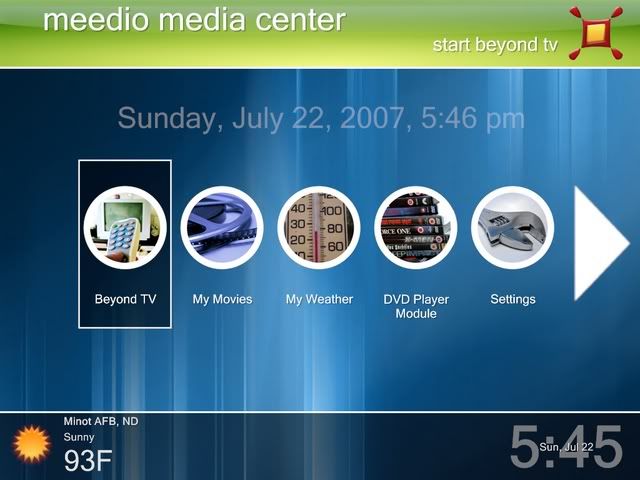
The above is a screen-shot of Meedio with the hdeetv theme. More info below.
Meedio Essentials is the award-winning solution for transforming an existing PC into an all-in-one multimedia system. Organize and enjoy your digital photos, music, and movies using an attractive graphical interface that works great with a TV and remote control. This integrated digital media center even includes weather forecasts, maps, news, and games — all of which you can enjoy from the comfort of your couch. Plus, you can personalize the entire system with hundreds of user-contributed themes, add-ons, and extensions available through the Meedio Add-Ins Directory and built-in Meedio Update module.
As I said before, behind Meedio LLC the company, is Meedio the idea and all of us want to see it succeed. The sad truth is that we had recently hit a brick wall and did not have the resources to make it flourish. But, Yahoo! has a great team that is just as dedicated and passionate as we are in this space and, of course, they carry the content and might of an early Internet pioneer. Together, the combination can be nothing but a winner. We are thrilled at the opportunity to put the Meedio idea together with the Yahoo! experience and bring it to millions of people all around the world!
Quoted from Medio Official Site Home Page
And now for the good news.
MeediOS is an open source project and community continuing the magic of Meedio onto the next level. See our MeediOS roadmap.
MeediOS - the new open-source HTPC front-end [forum] [svn]
Meedio Ultimate - an updated Meedio installer [forum] [download] [svn]
Bluepill - the auto-updating self-configuring HTPC [forum] [download] [svn]
This website also unofficially supports the old closed-source Meedio product (and Yahoo's Go4TV) via forums (please take care to post in the Meedio section), wiki (also contains the old MDN with many corrections and additions), and a new add-in repository, OpenMAID.
I've tried several different free media centers which I didn't care much for. Then I stumbled upon Meedio. At first I was discouraged because Meedio had already been bought by Yahoo. I did a little research and found out that there was another group (MeedioOS) that was trying to keep the Meedio software going. I was reading the MeedioOS forum and saw that there was still a free download for Meedio 1.41. I proceeded to download and install the software. I was amazed at how much you could customize the software.
HP’s TouchPad—and the $99 fire sale that came with its death—will slow the market share gains for Android tablets, according to IDC. IDC...
Welcome to my blog.
This is a place to display all of my hobbies and interest that I think would also interest other people like me. Feel free to leave comments and enjoy some music while your here. Be sure to rate the post.
About Me
-Live in North Carolina -Served 4 years in the Air Force
Hobbies -Computers -HTPC Computers -Photo editing -Playing guitar -Family Tree Research